Generative UI with MCP Apps and Spring AI
How to build interfaces that the AI spawns on demand.
Introduction
The simplest interactions with AI agents today are text-based: a user asks a question, and the agent responds in text.
Generative UI challenges that pattern. Instead of defaulting to text, the system can render a card, a grid, or a form based on what the user is trying to accomplish. The interface itself becomes part of the response.
MCP Apps offer one of the simplest ways to implement this idea. An MCP tool can point to an HTML resource that the host renders as UI, making the interaction more visual and interactive.
In this post, we’ll build a generative UI experience using MCP Apps and Spring AI that lets users search Open Library for books.
The full code for the example is in my GitHub repository
The problem with text-only tool results
LLMs connected to tools usually return their results as text in the chat interface, even when the underlying task would be easier to handle visually.
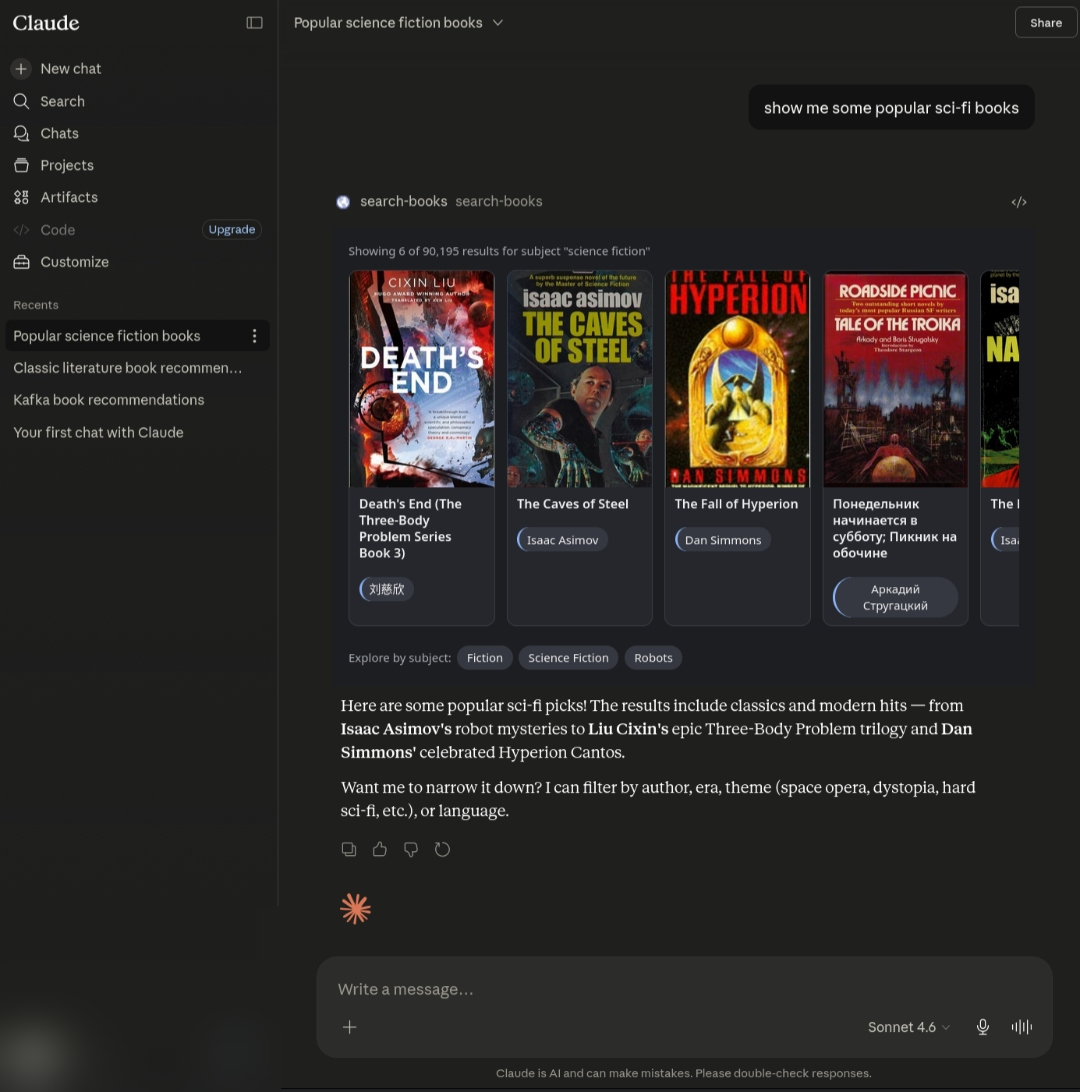
You ask for books about Science Fiction, the model calls a search tool, formats the results, and sends them back as a textual response.
That works, but text is a poor fit for visual browsing tasks:
- Book covers don’t fit well in plain text responses.
- Refining a search often means sending another prompt instead of clicking UI controls
- Follow-up turns can force the model and the user to keep reconstructing context from the conversation history.
Generative UI addresses that limitation by letting a tool invocation bring along the interface best suited to the task. With MCP Apps, that interface can be rendered as an embedded HTML widget inside the conversation rather than as a separate application the user has to open and navigate.
What Generative UI actually means
The key property is that the developer defines the available tools, but the model decides when a tool is relevant.
When the model invokes the right tool, the host can render its UI directly in the conversation, so the interface emerges from the interaction.
That’s different from hardcoding a rule like “if the user says books, show the search panel.” In that case, the developer is routing explicitly. In generative UI, the model participates in choosing the interaction pattern based on the user’s intent.
In our example, we’ll create a search-books tool and describe when it should be used. The model will use that guidance to decide whether the tool is appropriate for a given user request.
MCP Apps
MCP (Model Context Protocol) is an open standard for connecting AI hosts to external capabilities such as tools, resources, and prompts. MCP Apps extend that model by letting a tool declare a _meta.ui.resourceUri that points to an HTML resource, typically served with the ui:// scheme. When a compatible host such as Claude, or a custom client sees that metadata, it fetches the UI resource and renders it in a sandboxed iframe inside the conversation. The iframe and host then communicate through a bidirectional bridge built on JSON-RPC over postMessage, commonly using the @modelcontextprotocol/ext-apps SDK.
Through that bridge, the iframe can:
- Receive tool input and tool results from the host
- Update model-visible context so follow-up turns reflect what is happening in the widget
- Send messages into the chat on behalf of the user (chip clicks, drill-down)
- Ask the host to open external links
The end result: the model decides to call your tool, and a fully interactive widget materialises in the conversation. Generative UI.
The example: Open Library book search
The project exposes a search-books tool that finds books from Open Library’s public API. When the model calls it, triggered by messages like “find books about AI” or “Tolkien in Spanish”, the host renders a panel showing cover images, titles, and chips for refining the search by author or subject.
No “open the book search app”. No separate window. The conversation generates it.
The sequence of events:
- User: “find me books about artificial intelligence”
- LLM calls search-books(subject=”Artificial Intelligence”)
- Tool returns BookResults JSON + ui.resourceUri in metadata
- Host fetches ui://books/search-results.html, renders it in iframe
- Iframe connects to host via ext-apps
- Host pushes the tool’s result JSON to the iframe via ontoolresult
- Iframe parses the result and renders cards: cover, title, author chips
- Iframe posts active filters to model context via updateModelContext
- User clicks “Machine Learning” chip
- Iframe posts “Search books with subject=”Machine Learning”” to the model
- LLM reads model context (current filters), calls search-books with refined filters
- New widget renders
The chip click doesn’t open a new page or call an API directly. It sends a message to the model, which then decides how to invoke the tool. The model stays in the loop.
Building the server with Spring AI
Spring AI 2.0.0-M7 added MCP annotations that make defining tools and resources concise:
1
2
3
4
5
6
7
8
9
@McpResource(uri = "ui://books/search-results.html",  mimeType = "text/html;profile=mcp-app",  metaProvider = CspMetaProvider.class)
public String getSearchUi() throws IOException {
  return searchUi.getContentAsString(UTF_8);
}

@McpTool(name = "search-books", ..., metaProvider = SearchBooksMetaProvider.class)
public BookResults searchBooks(String query, String author, String title, String subject, String isbn, String language, Integer limit) {
    return doSearch(...);
}
The SearchBooksMetaProvider is what tells the host to render the iframe:
Map.of("ui", Map.of("resourceUri", "ui://books/search-results.html"))
The CspMetaProvider tells the host which external domains the iframe is allowed to load from:
1
2
3
4
List.of("https://unpkg.com",           // ext-apps JS SDK
    "https://covers.openlibrary.org",  // book cover images
    "https://archive.org",             // Open Library redirects covers here
    "https://*.archive.org")           // specific CDN mirror subdomains
Transport is Streamable HTTP:
1
2
spring.ai.mcp.server.protocol=streamable
server.port=3001
The panel is a self-contained HTML file served by the @McpResource endpoint. It imports ext-apps and wires up the host bridge before connecting:
1
2
3
4
5
6
7
8
9
10
import { App } from "https://unpkg.com/@modelcontextprotocol/[email protected]/app-with-deps";
const app = new App({ name: "search-books", version: "1.0.0" }, {});

// Register handler BEFORE connecting so the initial push isn't missed.
app.ontoolresult = (result) => {
    const data = extractData(result); // parse first text content item as JSON
    renderCards(data);
};

app.connect();
The host pushes the search-books tool result directly into the iframe.
Once cards are rendered, chip clicks send messages back into the conversation:
1
2
3
4
app.sendMessage({
    role: "user",
    content: [{ type: "text", text: `Search books with subject="Fantasy"` }]
});
And after every render, the iframe tells the model what’s currently on screen:
1
2
3
4
5
6
7
app.updateModelContext({
    content: [{ type: "text",
        text:`Active filters: subject="Fantasy".\n` +
        `Titles shown: "The Hobbit", "The Lord of the Rings".\n` +
        `If the user refines, call search-books with these filters plus any additions.`
    }]
});
This is what makes conversational refinement work. When the user says “now in Spanish”, the model reads the context update, sees subject=”Fantasy” is still active, and calls search-books(subject=”Fantasy”, language=”spa”) instead of starting over.
Generative UI isn’t just about spawning the widget, it’s about keeping the model informed of what the widget is showing so the conversation stays coherent.
Running it
Prerequisites: JDK 24+, cloudflared, Claude AI or any MCP App compatible host.
Execute: ./scripts/dev.sh
That boots the server and opens a Cloudflare quick tunnel, then prints the public URL to paste into claude.ai’s connector dialog:
─────────────────────────────────────────────────
Public MCP endpoint: https://your-tunnel.trycloudflare.com/mcp
Add as a Custom Connector in claude.ai
─────────────────────────────────────────────────
After adding the connector, simply ask: “find me books about artificial intelligence”. The model calls the tool, the panel appears, search results render.
Quick tunnel URLs are ephemeral, they change on every restart. For a stable URL, use a named Cloudflare tunnel under an account.
What makes this Generative UI and not just a widget
The distinction worth drawing:
Traditional flow:
- developer routes user to a book search UI
- UI calls an API
- Results appear.
Generative UI flow:
- user talks to a model
- model decides a book panel is the right response
- panel appears
- conversation continues around what the panel shows
The routing is inside the model. The developer’s job is to define the tool well enough that the model knows when to use it.
In practice that means:
A tool description that states when it applies (“use when the user asks about books, authors, ISBNs, or wants to browse a library catalog”)
A clear parameter schema (query, author, subject, language. The model fills these from the user’s message without being told to)
Context updates so the model stays aware of widget state across turns
When those three are right, the experience feels like the conversation generated the UI.
Conclusions
MCP Apps make generative UI surprisingly approachable. The pattern is: define a tool, point it at an HTML resource, and let the model decide when to invoke it. No routing logic, no separate frontend deployment, no app switching. The interface lives inside the conversation.
What works well
- You don’t need to run an LLM. The host (Claude or whichever MCP compatible client the user is running) brings its own model. Your server only needs to expose tools and resources. No GPU, no model hosting, no inference infrastructure.
- The model handles intent routing. A single well-described tool replaces a whole layer of conditional UI logic.
- The widget stays in the loop.
updateModelContextlets every render inform the next turn, so refinement feels natural rather than requiring the user to re-explain their intent. - The stack is small. One Spring Boot service with a handful of annotations and a single HTML file is enough to ship a working generative UI.
The trade-offs
- UI and backend live in the same artifact. The HTML is served as a
@McpResourcefrom the same Spring Boot app, which is convenient but blurs the line between server and frontend. For a simple tool this is fine. - The widget depends on the host.
ontoolresult,sendMessage, andupdateModelContextare only available in MCP App compatible hosts. If the host doesn’t support the extension, the iframe loads but the bridge doesn’t connect. Graceful degradation requires extra effort. - Prompt sensitivity. The tool description is doing real work here: the model’s decision to call the tool, which parameters to fill, and how to handle refinement all depend on how well the description is written. That’s a new kind of skill to develop, and it’s harder to test than a routing table.
On Spring AI
The Spring AI version supporting MCP Apps is still in milestone release. The MCP annotations used here (@McpTool, @McpResource, MetaProvider) are new additions and the API might change before GA. For production use, pin your versions carefully and watch the Spring AI changelog.
That said, Java for AI is a real thing. The JVM ecosystem (mature HTTP clients, dependency injection, observability tooling, and decades of enterprise patterns) pairs well with the emerging MCP standard. Spring AI brings those strengths into the agent space without requiring teams to rewrite their backends in a new language.
MCP Apps in particular feel like a good fit for teams who already have a Spring backend and want to add AI driven UI without adopting a separate frontend framework or a new runtime.