Evaluating your MCP tools
How to run evaluations on the tools provided by your MCP Server

Introduction
An MCP (Model Context Protocol) tool is a function that your LLM can call at runtime to interact with external systems. Think APIs, databases, or services your model would otherwise have no access to. Each tool is described by a schema: a name, a description written in natural language, and a set of typed parameters.
When a user sends a message, the LLM reads those descriptions and decides whether to call a tool, which one to call, and what arguments to pass. The quality of that decision depends almost entirely on how clearly the tool’s description communicates intent.
In this post we pick up from our previous GenUI + MCP Apps article where we built a search-books MCP tool backed by a Spring Boot server. This time, instead of building, we are evaluating. We will use promptfoo to verify that an LLM consistently picks the right tool parameters for a given user request, compare multiple models side by side, and test how models handle multi-turn conversations.
The full code for the example is in my GitHub repository
Single Turn Evaluations
Let’s start by testing prompts that require no prior conversation context. The core question we want to answer is: given a self-contained natural language request, does the LLM invoke our tool with the correct arguments?
These are called single turn evaluations. Each test case is an isolated prompt with a single response, no conversational history attached.
Looking back at our code, the McpTool definition that enables book search looks like this:
1
2
3
4
5
6
7
8
9
10
11
12
13
14
15
16
17
18
19
20
21
22
23
24
25
26
27
    @McpTool(
            name = "search-books",
            title = "Search Open Library",
            description = """
              Search Open Library and display matching books in a UI panel
              (cover, title, author, and chips for related searches).

              Provide at least one of: query, title, author, subject, isbn, language.

              FIELD SELECTION
              All parameters are ANDed by the API. Use as few as needed.
              Each field accepts a single value. Never express multiple authors or subjects in one call.
              For genre/theme intent, map to the best matching OpenLibrary subject term and pass it as `subject`.
              Use `query` only for keyword lookups that don't fit any structured field: partial titles, proper names, or niche terms with no subject taxonomy entry.
              Do NOT combine `query` and `subject`. They will over-restrict results.
              """,
            metaProvider = SearchBooksMetaProvider.class)
    public BookResults searchBooks(
            @McpToolParam(description = "Keyword fallback: use only for partial/uncertain titles, proper names, or terms with no subject taxonomy entry. Never combine with `subject`.", required = false) String query,
            @McpToolParam(description = "Book title", required = false) String title,
            @McpToolParam(description = "Author name", required = false) String author,
            @McpToolParam(description = "Genre, theme, or topic inferred from user intent (e.g. 'space opera', 'gothic horror'). Prefer this over `query` for thematic searches. Never combine with `query`.", required = false) String subject,
            @McpToolParam(description = "ISBN", required = false) String isbn,
            @McpToolParam(description = "Three-letter MARC language code (eng, spa, fre, ger, ita, jpn, por, rus, chi, ara, etc.)", required = false) String language,
            @McpToolParam(description = "Max results 1-6, default 3", required = false) Integer limit) {
        return doSearch(query, title, author, author_key, subject, isbn, language, limit);
    }
Notice how the tool description and each parameter’s description work together to steer the LLM’s behaviour. For example:
For genre/theme intent, map to the best matching OpenLibrary subject term and pass it as subject.
This tells the LLM that any genre or thematic request (“books about space opera”, “gothic horror novels”) should be mapped to an OpenLibrary subject rather than passed as a raw keyword. The reinforcement in the subject parameter description (“Prefer this over query for thematic searches”) makes the intent doubly clear, reducing the chance of the LLM falling back to the more generic query field.
Testing genre intent
Let’s define a test in promptfooconfig.llm.yaml that checks on this rule:
1
2
3
4
5
6
7
8
9
10
  - description: 'genre intent → subject param, never query'
    vars:
      user: 'show me some science fition novels'
    assert:
      - type: javascript
        value: typeof output?.subject === 'string' && output.subject.length > 0
      - type: javascript
        value: output?.subject?.toLowerCase() === 'science fiction'
      - type: javascript
        value: output?.query === undefined
This test is evaluating how the LLM is invoking our tool, but we are specifically asserting for 3 things:
- The subject passed by the LLM is not empty and is of type string.
- The value of the subject parameter sent to the tool is ‘science fiction’
- The query parameter is empty.
Note the deliberate typo fition instead of fiction. A proper LLM should silently correct this as part of normal query understanding before invoking the tool.
Let’s add more tests to evaluate if the tool is populating more of our parameters correctly.
Testing genre intent with language
The language parameter expects a MARC language code, which is a three letter identifier, not a plain language name. The LLM must translate user intent (“Spanish”) into the correct code (spa). Combined with subject extraction, this gives us a good test of how confidently the model handles multiple parameter mappings at once:
1
2
3
4
5
6
7
8
  - description: 'language intent → MARC code + subject populated'
    vars:
      user: 'find me Spanish language books about astronomy'
    assert:
      - type: javascript
        value: output?.language === 'spa'
      - type: javascript
        value: output?.subject?.toLowerCase() === 'astronomy'
Results
To run the evaluations with prompotfoo, we run the following command:
1
2
3
4
5
6
7
8
9
10
11
12
13
14
15
16
17
18
19
20
21
22
23
24
promptfoo eval -c promptfooconfig.llm.yaml
Starting evaluation eval-Wcp-2026-06-07T16:22:45
Running 6 test cases (up to 4 at a time)...

┌──────────────────────────────────────────┬───────────────────────────────────────────────────────┐
│ user                                     │ [ollama-mistral-small] You are a book-discovery       │
│                                          │ assistant. Call search-books to answer. No clarifying │
│                                          │ questions.                                            │
├──────────────────────────────────────────┼───────────────────────────────────────────────────────┤
│ find me books by Tolkien                 │ [PASS] {"author":"Tolkien"}                           │
├──────────────────────────────────────────┼───────────────────────────────────────────────────────┤
│ show me some science fiction novels      │ [PASS] {"subject":"Science Fiction"}                  │
├──────────────────────────────────────────┼───────────────────────────────────────────────────────┤
│ do you have The Hobbit?                  │ [PASS] {"title":"The Hobbit"}                         │
├──────────────────────────────────────────┼───────────────────────────────────────────────────────┤
│ look up ISBN 9780261103573               │ [PASS] {"isbn":"9780261103573"}                       │
├──────────────────────────────────────────┼───────────────────────────────────────────────────────┤
│ find me Spanish-language books about     │ [PASS] {"language":"spa","subject":"astronomy"}       │
│ astronomy                                │                                                       │
├──────────────────────────────────────────┼───────────────────────────────────────────────────────┤
│ just give me one book about cats         │ [PASS] {"limit":1,"subject":"cats"}                   │
└──────────────────────────────────────────┴───────────────────────────────────────────────────────┘

✓ Eval complete (ID: eval-Wcp-2026-06-07T16:22:45)
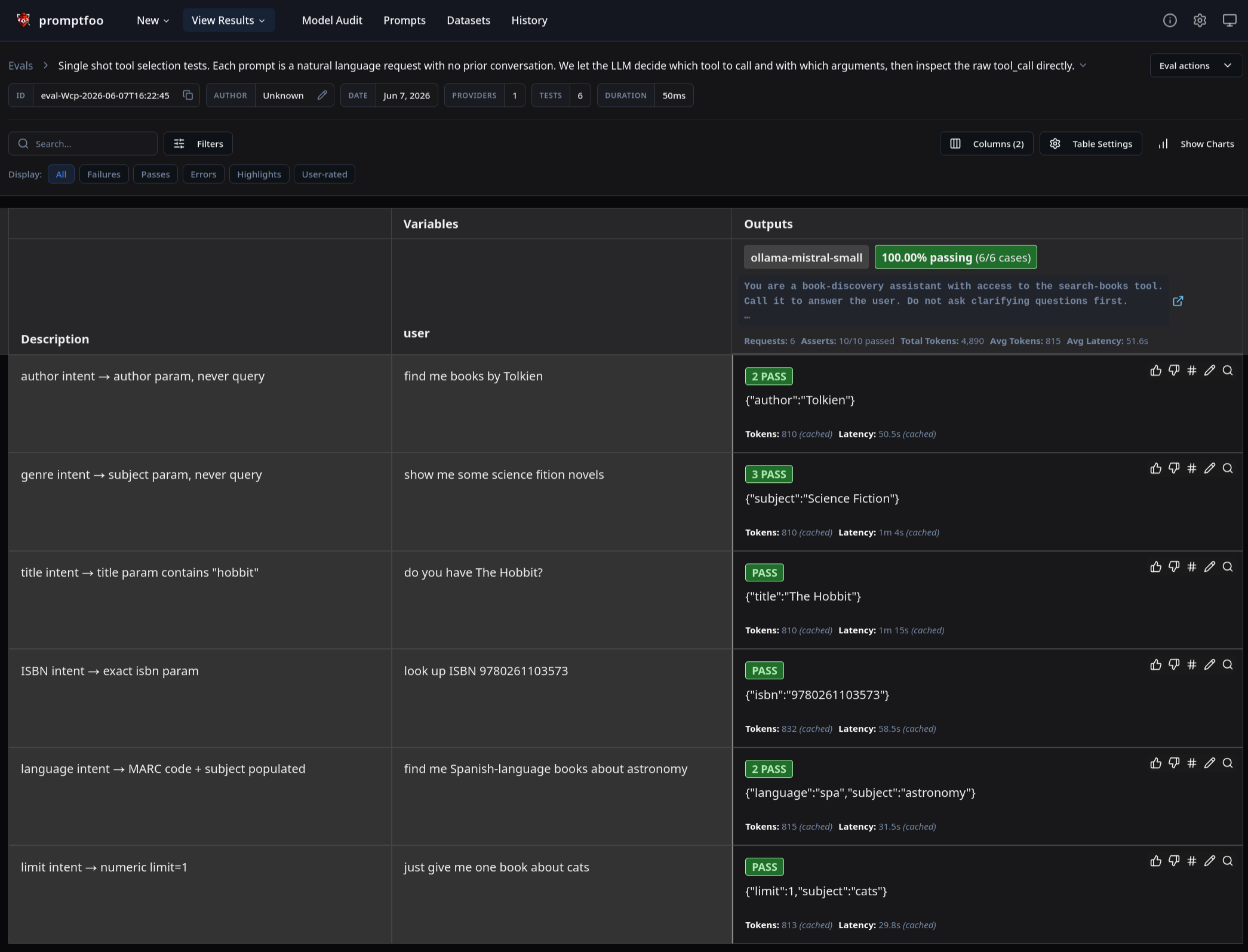
If you prefer to see the results in html (for sharing purposes or to analyze results closer), you can run view:
1
promptfoo view
And it should show the results in your browser
Multi Turn Evaluations
Real world usage rarely fits into a single prompt. Users often refine their intent across several exchanges, narrowing by author, switching language, adjusting scope. We need to verify that the LLM carries conversation context forward correctly when invoking the tool.
Let’s add the following to the tool description to make this behaviour explicit:
1
2
3
    """CONVERSATIONAL REFINEMENT
    When the user narrows a previous search (e.g. "now by Tolkien", "only in Spanish", "and about dragons"), carry forward ALL previously applied parameters and add the new one.
    Only reset filters when the user clearly changes topic (e.g. "now show me books about History")."""
Now let’s write a test for a three-turn conversation where the user progressively refines their search: first by subject, then by author, then by language:
1
2
3
4
5
6
7
8
9
10
11
12
13
14
15
16
17
18
19
  - description: 'multi turn: retain `subject` + `author` when adding `language`'
    vars:
      history:
        - role: user
          content: 'find me some science fiction books'
        - role: assistant
          content: '[called search-books with {"subject": "science fiction"}]'
        - role: user
          content: 'only from Asimov'
        - role: assistant
          content: '[called search-books with {"subject": "science fiction", "author": "Asimov"}]'
      current_turn: 'only in Spanish'
    assert:
      - type: javascript
        value: output?.language === 'spa'
      - type: javascript
        value: output?.subject === 'science fiction'
      - type: javascript
        value: output?.author?.toLowerCase() === 'asimov'
Additional multi-turn examples are available here. Please feel free to reference it.
To run the evaluation we use the same command:
1
2
3
4
5
6
7
8
9
10
11
12
13
14
15
16
17
18
19
20
21
22
23
promptfoo eval -c promptfooconfig.multiturn.yaml
Starting evaluation eval-zPC-2026-06-07T21:21:52
Running 3 test cases (up to 4 at a time)...

┌─────────────────────────────────────────────────┬──────────────────────────────────┬──────────────────────────────────────────────────────┐
│ history                                         │ current_turn                     │ [ollama-qwen2.5] prompts/multi-turn.js               │
├─────────────────────────────────────────────────┼──────────────────────────────────┼──────────────────────────────────────────────────────┤
│ user: "find me some cool science fiction books" │ only from Asimov                 │ [PASS] {"author":"Isaac Asimov","subject":"science   │
│ assistant: "[called search-books]"              │                                  │ fiction"}                                            │
├─────────────────────────────────────────────────┼──────────────────────────────────┼──────────────────────────────────────────────────────┤
│ user: "find me some science fiction books"      │ only in Spanish                  │ [PASS] {"author":"Asimov","language":"spa",          │
│ assistant: "[called search-books                │                                  │ "subject":"science fiction"}                         │
│   {\"subject\":\"science fiction\"}]"           │                                  │                                                      │
│ user: "only from A..."                          │                                  │                                                      │
├─────────────────────────────────────────────────┼──────────────────────────────────┼──────────────────────────────────────────────────────┤
│ user: "find science fiction by Tolkien          │ now show me books about WWII     │ [PASS] {"subject":"World War II"}                    │
│   in Spanish"                                   │                                  │                                                      │
│ assistant: "[called search-books                │                                  │                                                      │
│   {\"subject\":\"science fiction\",             │                                  │                                                      │
│   \"author\":\"Tolkien\",\"language\":\"spa\"}]"│                                  │                                                      │
└─────────────────────────────────────────────────┴──────────────────────────────────┴──────────────────────────────────────────────────────┘

✓ Eval complete (ID: eval-zPC-2026-06-07T21:21:52)
Choosing the Right LLM
Not all models support tool calling, and among those that do, quality varies significantly. Models like llama3.2, qwen2.5, and mistral-small support it via Ollama. You can also point promptfoo at OpenAI or Anthropic’s APIs if you prefer hosted models.
promptfoo makes it straightforward to run the same test suite against multiple models in parallel. In promptfooconfig.llm.yaml, each provider is defined like this:
1
2
3
4
5
6
7
8
9
10
11
12
providers:
  - id: openai:chat:llama3.2
    label: ollama-llama3.2
    config: { apiBaseUrl: http://localhost:11434/v1, apiKey: ollama, tools: file://tools/search-books.json }

  - id: openai:chat:qwen2.5:latest
    label: ollama-qwen2.5
    config: { apiBaseUrl: http://localhost:11434/v1, apiKey: ollama, tools: file://tools/search-books.json }

  - id: openai:chat:mistral-small
    label: ollama-mistral-small
    config: { apiBaseUrl: http://localhost:11434/v1, apiKey: ollama, tools: file://tools/search-books.json }
Run promptfoo eval and the results dashboard shows a pass/fail matrix across every (test, model) combination. This is useful for two things: picking the local model that most reliably calls your tool correctly, and diagnosing whether a failure is the model’s fault or your schema’s. If every model fails the same test, the tool description might be the problem.
Beyond model selection, this same suite can serve as a regression harness. Re-run it whenever you update a tool description or bring in a new model version, and you’ll know immediately whether anything regressed.
Conclusions
Evaluating MCP tools is less about testing code and more about testing the language that teaches an LLM how to use your code. A well crafted tool description and a promptfoo test suite give you a tight feedback loop: change a description, re-run evals, see immediately whether models now handle edge cases correctly.
The two-config approach used here — promptfooconfig.llm.yaml for single-turn parameter correctness and promptfooconfig.multiturn.yaml for conversational behaviour scales to any MCP tool. Start with single-turn tests to nail the basic intent-to-parameter mapping, then layer in multi-turn tests once you add statefulness or refinement logic to your tool description. Running both suites against a matrix of local and hosted models gives you the confidence that whichever LLM you ship with, it will call your tools the way you intended.